
Table of Contents
Recap & conclusions of phase 1
Before diving into phase two, let’s briefly revisit the goals of the Carmageddon project: It is a Data Science capstone project where I use deep learning techniques (Such as CNNs) to identify cars based on a car-listing website. The goal is to avoid using systems such as MechanicalTurk or manually tagging each image myself for usability (i.e. an image of a scratch in the paint is not a good image to train these kind of neural networks on). In step one I went in detail over the data-sourcing issues and performed some basic EDA-steps. If you’ve read that, you might recall that the data as it ended up being collected posed some challenges:
- The data was messy – it contained pictures that would throw off the training process.
- The data was unbalanced – some brands of cars are much rarer than others, and older models are not as present as younger cars.
- The target labels (i.e. the brand and model of a car) are ambiguous; a Volkswagen Golf from the 90’s looks completely different from its modern counterpart.
Goals of phase 2
All the data is downloaded and available on the system; now is the time to separate unusable images from useful training samples. What’s considered as garbage depends on the overarching project goal. In my case I wanted to develop a system that can identify a car by it’s exterior. For this project, unusable images included:
- Interior photographs
- Close-up details
- Paperwork
- Dealer logos
- Placeholder images
- Vehicle photos with open doors or missing body panels.
You can accomplish this in multiple ways – but as part of the learning process I opted to train a model myself. This would give me the necessary experience to dial in a Linux system using an older AMD RDNA2 GPU for deep learning. At the end of phase 2 my goal is to have the following tasks achieved:
- Add a bounding box using YOLO for contour detection of the car.
- Add a binary flag to each image indicating if the image is usable or not.
- Label the perspective the photo (i.e. sideview, head-on view, diagonal view)
- Split my data in a train, test and validation set without any leakage between these sets and with proper stratification.
The order of these steps is important; there’s no point in computing bounding boxes for useless images – and it’s even detrimental to include them in the final datasets used for training. In the remainder of this post I’ll go over each step and explain the train of thought.
Bounding Box computation: YOLO
YOLO is one of the leading object detection models available right now. It’s used for making bounding boxes on images and making class predictions on what’s inside each bounding box. On paper, YOLO appeared to be an ideal solution for this project. Think about it – it pinpoints the region of interest of an image for my project and on top of that it tells you if that region is a car or not. This would help me to get rid of all the mess in my dataset, and since this model is fairly quick (it can even handle realtime feeds) I can run this overnight without any interaction and it’d only take a few hours to handle the full dataset.
However, practical testing revealed several limitations:
- YOLO did not distinguish between interior or exterior pictures – a picture of a steering wheel was labelled just the same as an exterior shot of a vehicle
- A part of a car is still the whole car
- Placeholder images of a covered car, did not get filtered out
- Good, useful images got filtered out
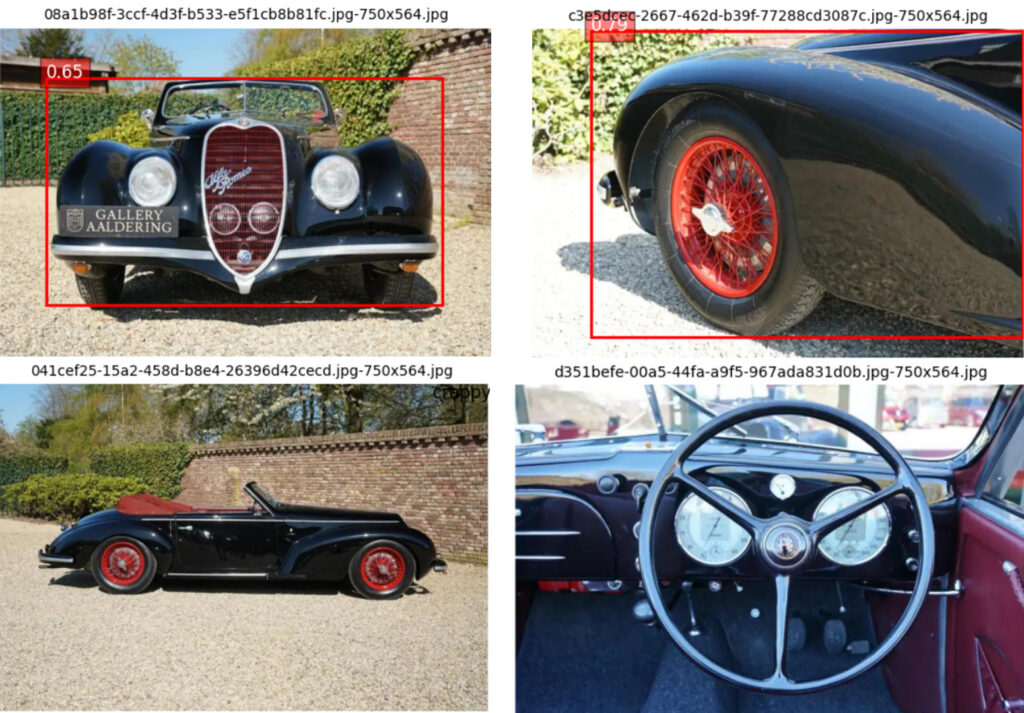
The above composite image can briefly be used to illustrate some of these issues the two image of the top row are images where YOLO assigned the label ‘Car’ to the red square. The float is the certainty with which YOLO made that class (label) prediction. We can see that YOLO was immensely certain about the rear right of the car, but it was much less certain about the front. The red square is what we call the bounding box, YOLO defines it by two pairs of X,Y coordinates. The top-left corner and the bottomright corner. These four values were stored in the MYSQL database that we used to organize all data that wasn’t an image. The two pictures on the bottom row tell a different story. The steering wheel was correctly not identified as a car, although for modern vehicles YOLO often assigns the same “Car” label to interior shots. That leaves us with the image in the bottom-left corner. It did not receive a bounding box – a shame as it’s actually a good image to include in our study.
Was it a useless operation then? Far from: we have a zone-of-interest now for each image. We can thus extend our project with a subquestion: Does cropping into an image improve the performance of a CNN? It also had an unexpected benefit when using cloud GPU’s – by preprocessing the images locally and cropping them to the useful part I could reduce the hard drive space I needed to rent significantly.
Usability and angle tagging: To use or not to use – that’s the question.
The goal of this phase was to classify images as either usable or unusable. Since the database contained more than 15 million images, the process needed to be largely autonomous and require minimal manual effort. The easy way to do it is use a pretrained model and have it filter out the good from the bad images. While a pretrained model could have solved this problem immediately, I chose to build the solution myself for both educational and technical reasons. Furthermore, there was a good technical reason to implement this myself. So I first had to make my own training data – this was done with a simple Flask app that picked a random image and presented it to me. For a limited amount of pictures I manually assigned whether the image was usable (i.e. was an exterior shot of the car with the doors closed, bodywork intact and showed the entire car). A click interface with eight options allowed me to tag the angle as well – more on the importance of the angle in part 3 of this capstone project. The goal was to assign a minimum of 500 images to each of the following categories:
- Unusable image
- Usable – Front view: shows the front of the car, picture taken from between the car’s track width.
- Usable – Rear view: shows the rear of the car, picture taken from between the car’s track width.
- Usable – Leftside view: shows the left side of the car, picture taken from between the wheelbase of the car.
- Usable – Rightside view: shows the right side of the car, picture taken from between the wheelbase of the car.
- Usable – Front-right view: front and right side of the car, picture is not taken between the wheelbase and track width.
- Usable – Front-left view: front and left side of the car, , picture is not taken between the wheelbase and track width.
- Usable – Rear-right view: rear and right side of the car, picture is not taken between the wheelbase and track width.
- Usable – Rear-left view: rear and left side of the car, , picture is not taken between the wheelbase and track width.
Adding these tags manually gave one dataset that could be used for multiple tasks. First of all I could train a binary classifier – or in simple terms: a model that says Yay or Nay to any image it sees. This would help me to weed out the usable (Yay) from the unusable (Nay) images. The second model I could train with those tags is an angle tagger; this model would predict any of eight learned angles for any usable image it is given. Any image should only have a single label, these models we call multiclass classifiers. It would have been perfectly possible to make a single model that predicted nine labels (Unusable and the eight angles), however, the hardware that was used to train these models was an unsupported RDNA2 AMD GPU. To dial the system in, it’s easier and quicker to train two relatively small models than a single big model. On top of that, my experience of the binary classifier model would make the multiclass classifier easier to implement as I was able to identify all the issues surrounding AMD’s RDNA2 GPU-architecture and training CNNs. Think of this approach as learning to walk before you learn how to run.
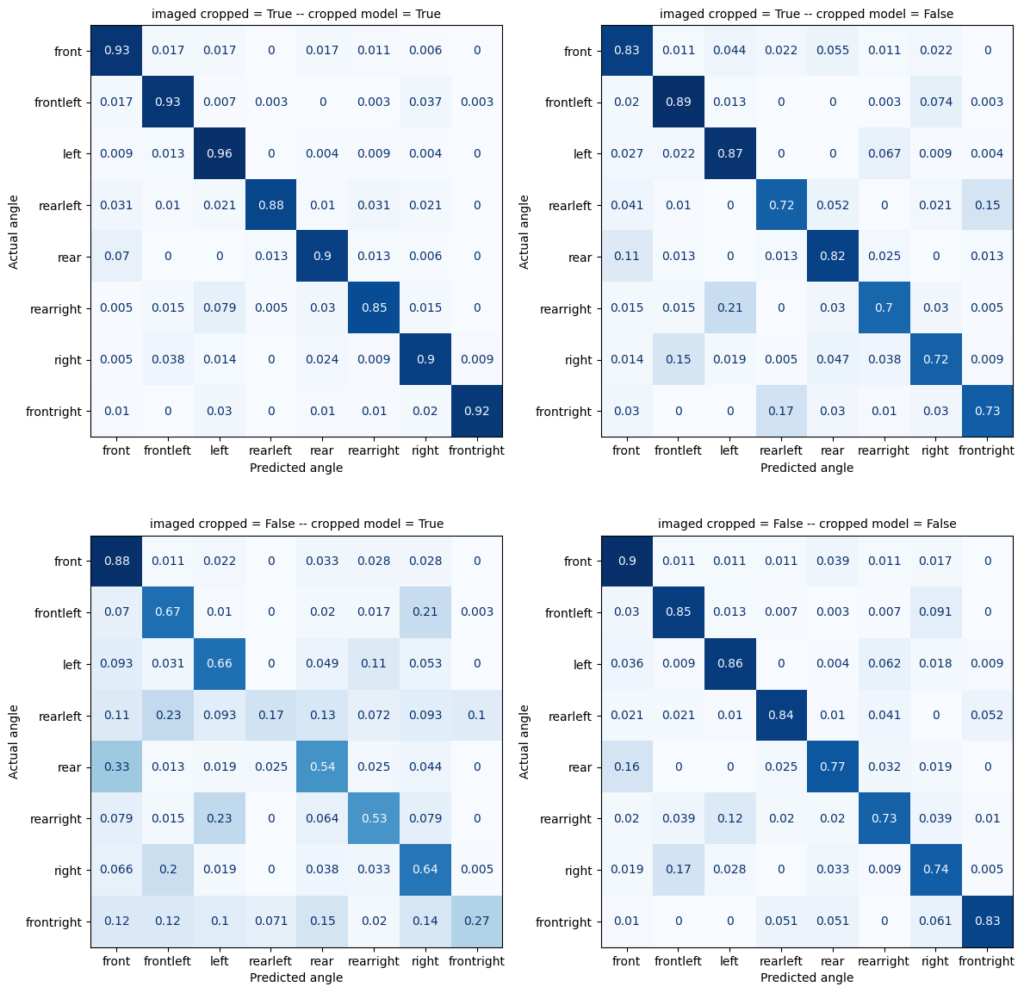
Training the model is relatively straightforward, but evaluating it correctly is more challenging. That’s why we give the trained model images it didn’t see during its training phase and we ask it to predict the correct label. Since we’ve manually tagged those images, we know the correct answer. By comparing the known correct answer (y-axis) to the predicted answer (x-axis) we can get a confusion matrix. This handy little chart allows you to assess a model’s weaknesses and shows them per class, it shows you if it is over-eager to assign an image to a specific class; or if it failed to learn the traits that belong to a specific class. An ideal confusion matrix is a diagonal line, with zeros on the non-diagonal axis. However as we know, the world is not ideal and confusion matrices rarely are too.
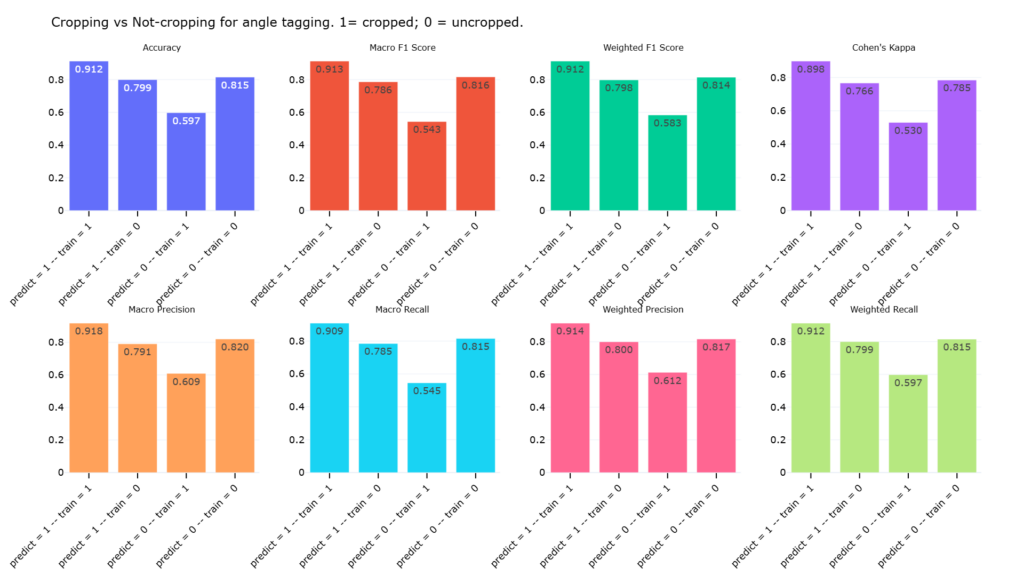
In my confusion matrices I wanted to see if having bounding boxes was a worthwhile investment (i.e. did it improve the output of my models). During testing I found that cropping my images actually slowed down my code by a few milliseconds per image, however, given the size of the dataset these milliseconds end up being significant. The four confusion matrices below compare four different train-prediction flows. Each flow used the exact same images for training and the same unseen images for inference. There was no leak between training-data and the unseen data. To evaluate the effect of cropping, I tested four training-inference combinations:
- Trainingdata cropped & Inference images cropped (Top-left)
- Trainingdata uncropped & Inference images cropped (Top-right)
- Trainingdata cropped & Inference images uncropped (Bottom-left)
- Trainingdata uncropped & Inference images uncropped (Bottom-right)
Remember, all four tests were done with the same unseen images base images and the same images for training, the only difference is whether or not they were cropped at none, one or both stages. The second image below shows various metrics, for the overall prediction quality. It’s a higher level view of our model’s performance. The results showed a clear pattern: models performed best when both training and inference images were cropped using the YOLO-generated bounding boxes. While cropping introduced a small computational overhead, the increase in classification accuracy more than justified the additional processing time. Based on this test I made the decision to perform cropping on training images and crop unseen images that need to be predicted in the final brand-prediction stage which we’ll discuss in part three.
Data splitting and data balancing
You may ask yourself – why do you only split your data here? Well, I’m not going over all the technical details in this blog; in fact I’ve performed a train-test-validation split in previous steps for which I implemented my own reusable utility on top of SKLearn’s train_test_split method. Like this I can reproduce my splits cleanly, quickly and reliably and rest assured that my train-, test- and validationdatasets have no overlap and the correct ratios. With two lines of code I can apply my utility anywhere in my project:
stratcols = ['brand', 'model_label']
trainset, testset, valset = cnn_helpers.train_test_val_splitter(
                                data,
                                TRAINSAMPLE,
                                TESTSAMPLE,
                                VALIDATIONSAMPLE,
                                stratcols
                            )
The snippet starts with defining a list, this list refer to the column names that I want to stratify on. Stratification is the list of features you want to have equally split across multiple subpopulations. In this case, I find it important that there’s an equal distribution of brands and models across all three datasets. The constants TRAINSAMPLE, TESTSAMPLE and VALIDATIONSAMPLE were set to 70, 20 and 10. To illustrate: imagine the dataset contains 200 unique Volvo V50 images and 150 unique Audi A4 images. The splitter would assign approximately 140 Volvo and 105 Audi images to the training set, 40 Volvo and 30 Audi images to the test set, and the remaining 20 Volvo and 15 Audi images to the validation set. There’s no duplicate image across the three different dataset.
Important to understand at this stage was that the dataset had shrunk considerably. Starting from roughly 15.8 million downloaded images, the usability filtering phase reduced the dataset to fewer than five million usable images. While this was still a substantial amount of data, it created a new challenge: smaller brands such as Alpine, Lotus, or Alfa Romeo now had relatively few usable images compared to popular brands such as Audi, BMW, or Volkswagen. Especially for training this is problematic.
To work around that problem of imbalance, the train-test-validation split was followed by a data augmentation phase. My target was to have 10.000 images for every brand-angle combination in my trainingset. Since there are eight angle categories, this translated to a target of 80,000 training images per brand in the trainingdataset. For popular brands such as Audi or Volkswagen, there were more than enough images available. In those cases I simply undersampled the data by randomly selecting 10,000 images for each brand-angle combination. So, when we add up all the numbers: thirty brands in the study, eight angles and 10.000 images per brand-angle combo, that brings us at 2.4 million images for the trainingdataset alone. On top of this there are different images per brand-angle combination in my testdataset and in my validationdataset.
One particularly effective augmentation strategy involved mirroring images. A left-side view of a vehicle can be flipped over the y-axis to create a realistic right-side view, and vice versa. Because the angle classifier had already assigned confidence scores to each image, I only applied this technique to side-view images that were classified with very high confidence. This allowed me to generate synthetic training examples while preserving label quality.
Additional augmentation techniques such as rotation, zooming, and small geometric transformations were then used to create the remaining samples required to reach the target count. Importantly, these augmentations were applied exclusively to the training set. The test and validation datasets remained untouched, ensuring that model performance was always evaluated on real, unseen images. Images of my test- and validationdataset weren’t used as source images for augmentation purposes. If all of this sounds overwhelming, take a look at the chart below that visualizes my data processing steps discussed so far.
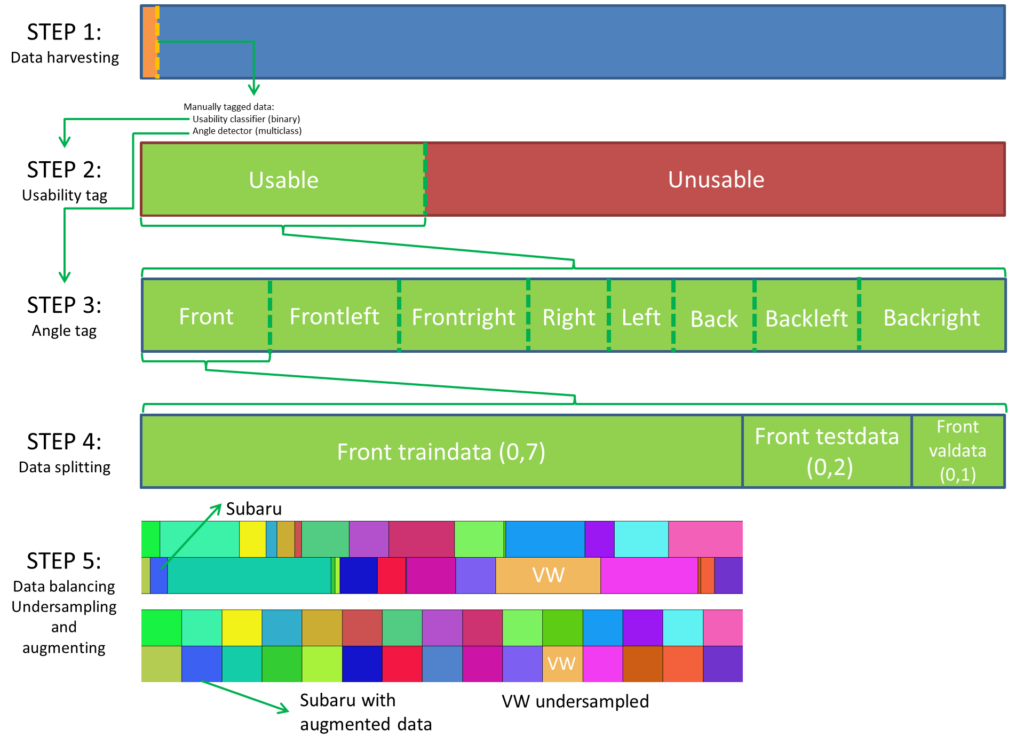
By centralizing both the splitting and augmentation logic in a single reusable workflow, every model trained in the later stages of the project operates on exactly the same underlying data. This not only makes comparisons between different architectures fairer, but also significantly reduces the amount of preprocessing work that needs to be repeated for each experiment. Once the data balancing part was completed, all that’s left to do is save the image paths into the correct file for each of the different data-subsets (Traindata, Testdata and Validation data). The balancing was done for each of the eight angles; for brevity’s sake the illustration only shows this for a single angle.
Part two: achievements, summing up and what’s next:
In this part I got to grips with KERAS to train two CNNs (Convolutional Neural Network); the first – a binary classifier to remove useless images; the second a multiclass classifier to divide my dataset into eight subparts – each subpart represents a specific angle. I also managed to set up a workflow that’s easy to reuse so I can train these networks on my available hardware (an AMD RX 6700XT RDNA2 GPU).
Secondly we learned that less is more – showing less noise around the thing of interest, produced better results. This holds up for both the training and inference phases. The output of a workflow that uses cropped images during training and inference was more accurate, this accuracy however comes at the cost of computetime (i.e.: Bounding boxes need to be calculated by YOLO – after which the retrieved coordinates need to be applied to the image before the CNN can ingest it.).
Finally we performed a split of our data; this split guarantees a few things for us going forwards:
- The data is split without feature leakage – the dataset did not contain duplicate images; by setting in stone early on in which set (train-, test-, validationdata) each image belongs we can rest assured that any final validation and comparison of models happens on unseen data.
- Every model will see the same trainingdata, i.e. the augmented data only needs to be computed once saving me time down the road. Since we only apply data augmentation once, we do not need to worry about a sudden loss in augmentation quality.
Because of this we can try different models with each model using the exact same images for it’s training and testing phase. The validationdata can be used in a later step to compare the different models.In the next step we’ll start with training CNNs and ViT models, pitch them against each other and see if it’s better to train a single large CNN with all angles combined, or if it’s better to train eight small, angle-specific, CNNs.

Meet me Frédéric, the ex-twenty-something petrolhead navigating life in the little town of Leuven (and beyond!) while hurtling through space on this beautiful rock we call home. By day, I work magic as a coffee-into-code convertor, but when the weekend rolls around, you'll find me scaling walls (until gravity inevitably says `nope`), travelling into wonderland, and generally living life in carpe-diem-mode. Don't be surprised if you spot me snapping pics along the way - there's always a trusty camera somewhere! So buckle up, put the pedal to the metal, and come along for the ride with me!